
Connection status
A Wi-Fi icon next to the logo in the header shows how well M-Client reaches your vault's server, like in M-Files Desktop. Every 30 seconds M-Client measures the round-trip time to the server and shows the median of the last 3 measurements. Point to the icon to see the time.
| Icon | Round-trip time |
|---|---|
| 3 bars | under 50 ms |
| 2 bars | 50 to 149 ms |
| 1 bar | 150 to 299 ms |
| Orange | 300 ms or more |
| Orange, crossed out | no answer from the server |
While you work offline, the orange Offline badge shows instead of the icon.
The Connection Status window
Click the icon to open Connection Status. It says Your network connection is working well., …is slow., …is very slow. or You have no connection to the server., with the Round-trip time to the server. When the connection is slow or down, it adds: If your connection is slow or there is no connection to the server, contact your M-Files system administrator.
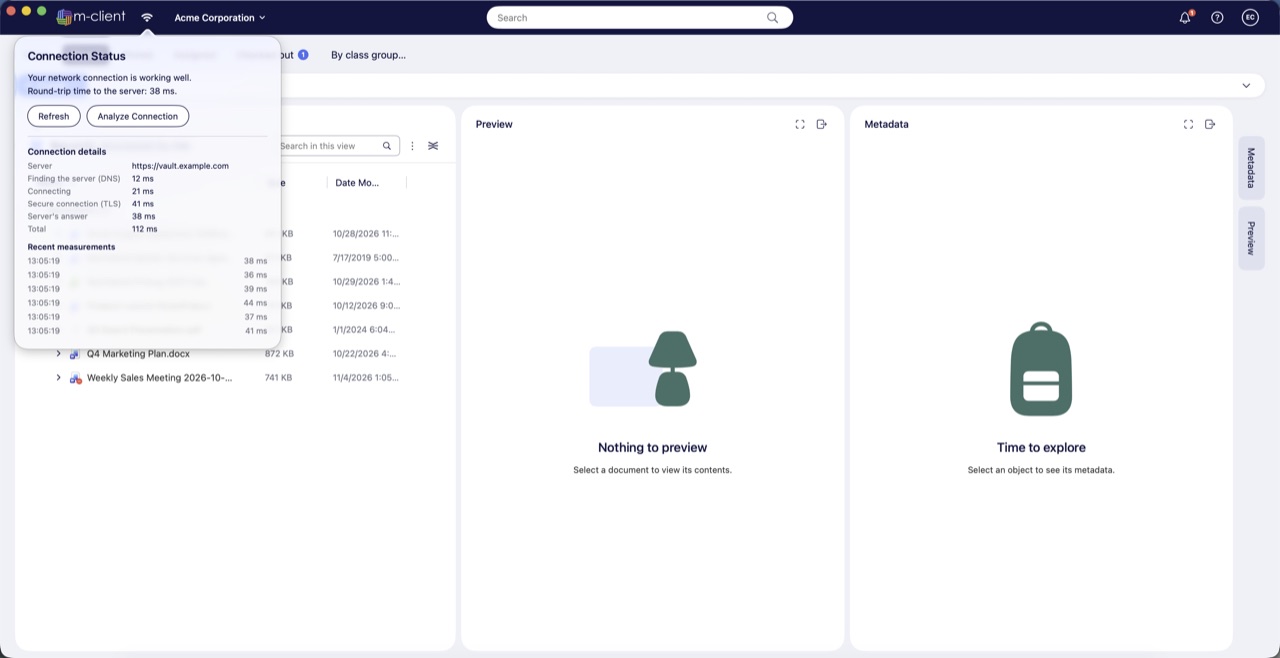
- Refresh measures the round-trip time again.
- Analyze Connection measures one request over a new connection and splits its time into Finding the server (DNS), Connecting, Secure connection (TLS), Server's answer and Total, with the server's address and your recent measurements.
When the connection is slow, the analysis also says where most of the time goes: to reaching the server, which points to the network, or to the server's answer.